- Feedback
- Share on


- About TransLōc






Mobile Access
There are several ways to get access to the real-time information while on the go:
- Apps for Apple and Android devices
- Mobile Web for mobile or less capable devices
Apps
Download the iPhone and
Android App with this QR code
The TransLoc App lets you see the real-time location of all vehicles, as well as access announcements that might impact your ride. Download the free app for your device:
Use with non-cellular devices requires a WiFi connection.
Mobile Web
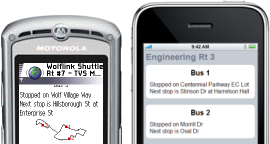
Mobile Web provides real-time location and next stop information as well as a small map for all active vehicles and routes. You can even access announcements that might impact your ride.
Your operator's charges for using the Internet on your phone may apply depending on your data plan.
Get the information you need anywhere, anytime:
http://bc.transloc.com/m/
http://bc.transloc.com/m/
How do you access the mobile site?
You'll need:
- A web-enabled mobile device. Examples include:
- Smartphones
- Many tablets, iPods, and similar internet-enabled devices
- Netbooks
- Most recent feature phones
- Access to the internet through your phone. Examples include:
- A web/data plan
- A Wi-Fi or hotspot connection
- Go to http://bc.transloc.com/m/ on your mobile device's browser.
FAQ
My phone doesn't include a data plan. Isn't checking the internet on my phone expensive?
Actually, it's not. We designed the Mobile Web site so that it would be inexpensive to access, even if you
don't have a data plan. The site relies mainly on text to display bus location and destination and doesn't have
any complex graphics to load, meaning you won't use many kilobytes to access the real-time location of your bus.
Check with your operator to determine the rates that apply to your phone and plan.
What if I don't have a smartphone?
Most mobile phones on the market now have internet-capability even if you don't have a smartphone. You can check
for the internet on your phone by looking for a web browser with one of the following labels (depending on your phone and
carrier): net, web, browser, Opera, Safari, Internet Explorer, MediaNET (on AT&T Wireless), Power Vision (on Sprint), or
Get It Now > News & Info (on Verizon Wireless).
Do you offer a text messaging option?
We don't offer SMS at this location.

